Three Levels of AI Automation for Legal Teams

Most people who use AI at work are still at the first level: open a chat window, ask a question, read the answer, close the tab. That’s manual use, and it’s genuinely useful, but it depends entirely on someone remembering to ask.
There’s a second level a lot of teams reach without naming it: a saved prompt structure for a recurring task, a fixed sequence of steps someone runs every time they need it. The use case is clear and repeatable, but a person still has to start it. Call it triggered use.
The third level is the one most legal teams haven’t reached yet, and it’s the one worth paying attention to: scheduled automation, where the trigger isn’t a person opening a chat, it’s the clock. The workflow runs at a set time or on a recurring window, with no one starting it and no one watching it run.
| Level | Who starts it | Who reviews the output | Audit trail |
|---|---|---|---|
| Manual | A person, every time | The same person, before acting on it | Not required, a human is the check |
| Triggered | A person, every time | The same person, before acting on it | Not required, a human is the check |
| Scheduled | The clock | Nobody, unless the platform builds in a review step | Required for high-risk use cases under the EU AI Act |
Why scheduled automation matters for legal work
Part of the recurring work in a legal context is administrative and structural. For example:
- A deadline check against a case calendar.
- A weekly status report pulled from a case management system.
- Routine data reconciliation between two systems of record.
None of these necessarily need a person to trigger them, they need to happen reliably, whether or not anyone remembers.
That’s a different requirement than “AI that answers questions well.” If you haven’t mapped which of your team’s recurring tasks already fit that pattern, our AI readiness playbook, written for in-house legal teams, walks through that audit; the same logic applies just as well inside a law firm.
Bot Scheduler: what scheduled automation looks like in e!
We built the Bot Scheduler for this gap. Any automation in e! that doesn’t require external input, for example a bot that checks a shared inbox every morning or scans a calendar for open slots, can be set to run on a rhythm instead of waiting to be opened.
Take a concrete case: a bot that scans a shared inbox for incoming NDAs and flags anything with non-standard terms. Instead of someone opening it manually each morning, it runs every weekday between 7:00 and 7:15, before the team’s day starts. Setup is two decisions: which days, and which time window on those days. Fifteen minutes, thirty minutes, or hourly repeats, a start and end time, and you’re done; a one-time run works the same way with a single day and time instead of a range.
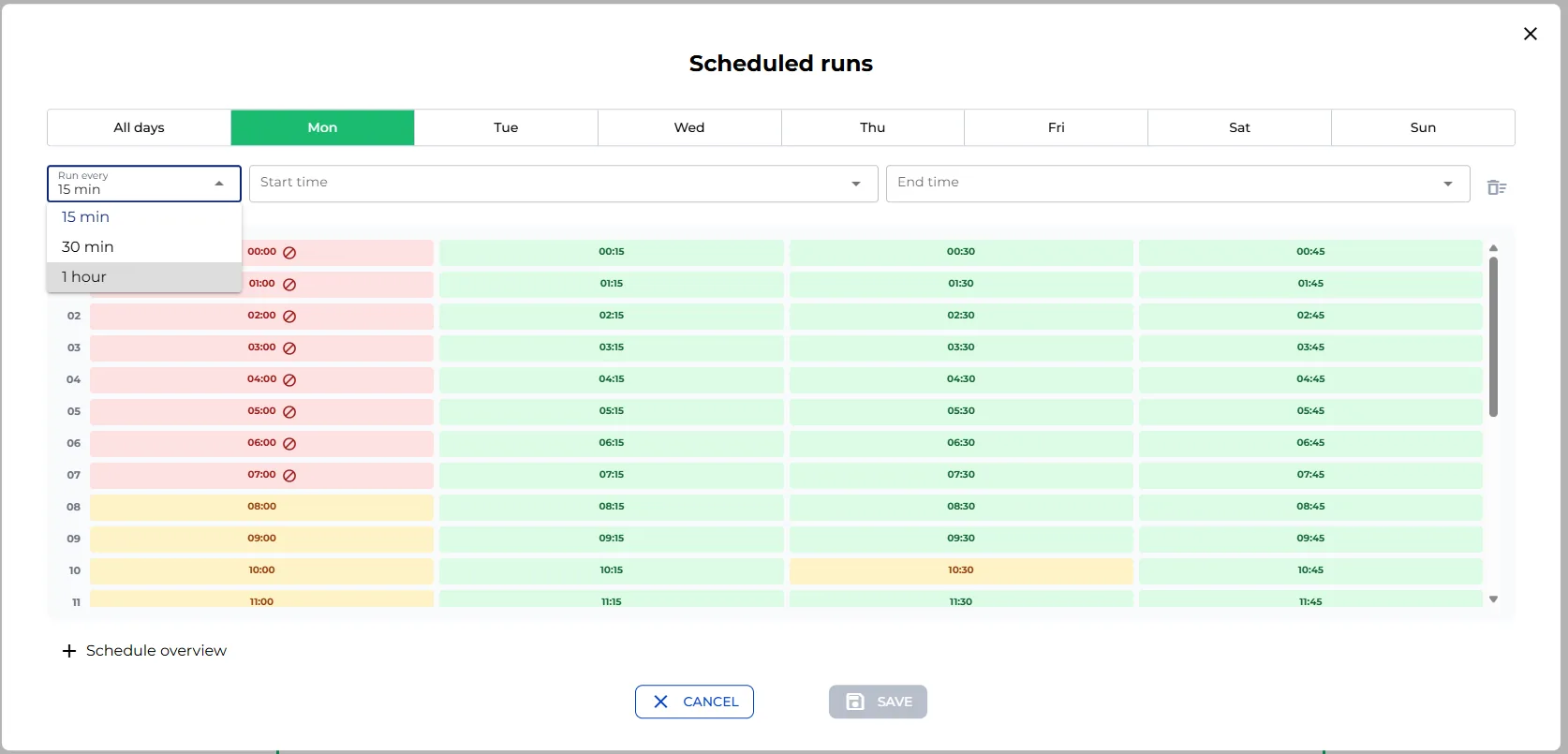
Admins get a workspace-wide dashboard showing which bots are scheduled, how many runs happen weekly, and where scheduling slots are getting tight, so scaling from one scheduled bot to dozens stays visible instead of becoming a black box. An admin can see every active schedule across the account from one screen, not by asking around.
Here’s a short video introduction of the Bot Scheduler by Lexemo Co-Founder Pascal Di Prima (language: German):

Watch: a Q&A on the Bot Scheduler feature (video in German), featuring Maraja Fistanić, Chief Revenue Officer, and Pascal Di Prima, CEO & Co-founder, both at Lexemo.
How to prevent autonomous mistakes by a scheduled automation
Worth being precise here: Bot Scheduler itself doesn’t page anyone when a run fails, and starting a run isn’t gated by a scheduling-level approval step. That’s different from the bot’s own workflow having no human checkpoint at all. An approval step can be built directly into the bot, the same way it can in any e! workflow, so a finding that needs to go into a client file, for example, can still route to a person for sign-off before it’s saved. What Bot Scheduler doesn’t do on its own is alert anyone if a run stops outright: what exists is the admin dashboard covered above, a report of every scheduled bot, its recent runs, and its configured windows, that an admin can check against what’s actually expected to catch anything that’s stopped running or drifted from its schedule.
Build the approval step into the bot itself if the workflow needs one, don’t rely on the scheduler to add one for you. The eligibility rule (no required user input, a defined completion step) rules out the most common cause of an unattended run stalling, a workflow stuck waiting on a field nobody is there to fill in, before it can happen in the first place. But for anything that touches deadlines or client data, treat the dashboard as something to check on a regular cadence, not a passive safety net that will flag failures on its own.
”I can already build automations myself with Claude or ChatGPT, why pay extra for third-party software?”
Fair question, and it deserves a straight answer instead of a sales pitch.
“I can schedule a prompt to run automatically, some AI tools already support this.” True for some general-purpose assistants, in a limited way. But scheduling a single prompt is not the same as scheduling a workflow with branching logic, form validation, and a defined output step. Bot Scheduler’s eligibility rule (no required user input, a defined completion step) exists specifically because unattended runs need a workflow that can’t get stuck waiting on a field nobody fills in. A bare scheduled prompt has no such guardrail.
“I have the skills to build this myself, so why pay for a platform?” You might. But scale is the real question, not skill. Gartner’s 2021 IT Symposium forecast, reported by VentureBeat, projected that citizen developers at large enterprises would soon outnumber professional developers 4 to 1. That’s not a skills problem, it’s a maintenance problem: once ten people across a legal team have each built their own scheduled automation, who owns the version control, and who can see all ten at once before they collide? Bot Scheduler caps shared time slots at ten schedules workspace-wide and warns at five, precisely because scattered, invisible automations are how a workspace hits limits nobody was tracking. Ten personal scripts across ten inboxes have no such limit and no shared view.
“My team already uses AI informally for things like this, so a scheduled bot isn’t really different.” It feels like a small step. It isn’t one. In a manual chat session, a person is still reading the output before it goes anywhere, catching the odd wrong answer or a piece of data that shouldn’t have been pasted in. PagerDuty’s 2026 Shadow AI Survey, based on 1,250 office professionals at companies with over $500 million in revenue, found that 88% had already shared work-related information with a public AI tool, and that happened with a human still in the loop reviewing every message. A scheduled workflow removes that reviewer entirely: it runs unattended, on a repeating clock, with nobody reading the output before it acts. That’s not a bigger version of manual use, it’s a different risk category, and the same survey found 66% had used AI tools at work despite believing their use wasn’t permitted under company policy in the first place.
“Do I even need formal guardrails for something this small?” If the workflow touches deadlines, client data, or anything a regulator would call a high-risk use case, yes. Since 2 December 2027 (postponed from 2 August 2026 by the EU’s Digital Omnibus on AI), Article 26 of the EU AI Act requires deployers of high-risk AI systems to keep automatically generated usage logs for at least six months and be able to demonstrate human oversight on request. A personal scheduled script has no audit log by default. A governed platform does, because the log is part of the workflow, not something bolted on afterward, and e!‘s infrastructure runs in Germany, so that audit trail doesn’t have to leave EU jurisdiction to prove itself.
None of this means individual AI use is bad, level one and level two are both genuinely useful, and most legal AI adoption today is still informal. The point is narrower: the moment a workflow runs without a person watching it, the requirements change from “can I do this” to “can I prove what it did, six months from now, to someone who’s asking.”
Where to start
Our recommendation: don’t start with a new use case. Pick a task your team already runs manually every week: a deadline check, a status report, a data sync.
- Confirm the task doesn’t need judgment calls on unusual facts.
- Check it against Bot Scheduler’s two eligibility rules: i) no required user input, and ii) a defined completion step (this also prevents a run from stalling).
- Set it to run on the clock, independent of a person’s memory or presence.
- Put a recurring five-minute check of the admin dashboard on someone’s calendar for the first month, to confirm performance and output.
Our use case canvas is a free framework for making that selection before you automate anything.
Frequently Asked Questions
What are the three levels of AI automation in legal work?
The three levels are manual use (a person asks a question and reads the answer), triggered use (a saved prompt or workflow a person still has to start each time), and scheduled automation (a workflow that runs on a time-based trigger with no person starting it). Most legal teams already use levels one and two without naming them.
What is a time-triggered AI workflow for a legal team or law firm?
A time-triggered AI workflow is an automation that runs on a schedule, for example every morning or every Monday, instead of waiting for someone to open a chat and ask a question. Deadline checks, status reports, and recurring data reconciliation are typical legal examples, since the trigger is the clock, not a person.
Why pay for a platform when I can build automations myself with an LLM like Claude or ChatGPT?
You can use an LLM to trigger AI manually or build a simple scheduled prompt, but most general-purpose AI tools do not offer built-in, unattended scheduling, audit logging, role-based access, or native integrations with the case management systems and other legaltech tools a scheduled workflow usually needs to connect to, all in one governed system. PagerDuty’s 2026 Shadow AI Survey found 88% of professionals had already shared work information with public AI tools, which is the exact risk unattended scheduling multiplies if there is no governance layer underneath it.
What does the EU AI Act require before a legal team automates a recurring workflow?
Since 2 December 2027 (the EU postponed this deadline from 2 August 2026 via the Digital Omnibus on AI), Article 26 of the EU AI Act requires deployers of high-risk AI systems to keep automatically generated usage logs for at least six months and demonstrate human oversight on request. A scheduled workflow that runs without anyone watching still needs that audit trail, which is a governance requirement, not an optional extra.
What kind of legal tasks are good candidates for scheduled bot automation?
Good candidates are recurring, rule-based tasks where the input source is stable and the output feeds a known next step: deadline monitoring against a case calendar, weekly status reports pulled from a case management system, and routine data reconciliation between two systems of record. Tasks that need judgment on unusual facts should stay manual or triggered, not scheduled.
Ready to automate your legal workflows?
Discover how e! can transform your legal operations with no-code automation.