Filing of Claims in Insolvency Proceedings: Automated Legal Intake & PDF Generation
Build a bot that guides creditors through the full proof-of-claim process under § 174 f. InsO (German Insolvency Code): it collects all required data, runs an AI-powered legal analysis against the uploaded documents, and generates a ready-to-sign PDF claim letter addressed directly to the insolvency administrator.
This tutorial walks through how the Filing of Claims in Insolvency Proceedings bot is built. In Part 2 you will see it running from the user’s perspective.
The bot guides creditors through the full process of filing a formal proof of claim in a German insolvency proceeding, in compliance with § 174 f. of the German Insolvency Code. It collects all required information, runs an AI-powered legal analysis against the uploaded documents and entered data, and generates a ready-to-sign PDF claim letter addressed directly to the insolvency administrator.
Note: the bot used in this tutorial was built in German, so the screenshots show German wording throughout. This is simply the language the bot was configured in. e! supports various languages, and you can build your own bot in English, Spanish, Italian, Arabic, or whichever language your users need. For your ease of reference, we have added the translation of the key terms under each screenshot.
Part 1: The Builder View
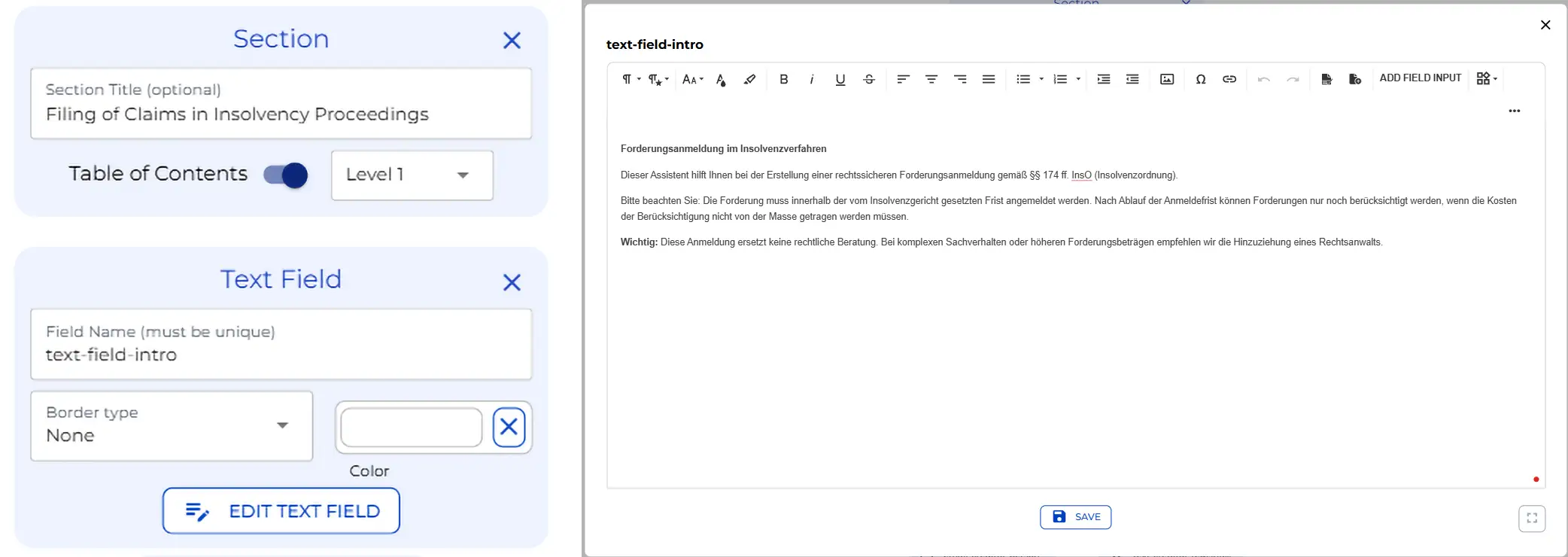
Step 1: Opening Section & Legal Context
The bot opens with a section node labelled “Filing of claims in insolvency proceedings” and a rich text field below it. That text field displays the legal context to the creditor before they fill in a single field: the relevant paragraph references, the deadline rule that applies after the court-set filing period expires, and a note recommending legal counsel for complex cases.
This is the place to update if you want to add jurisdiction-specific deadline information, the name of a contact at your firm, or any additional disclaimer your clients should see before they start.
| German | English |
|---|---|
| ”Forderungsanmeldung im Insolvenzverfahren” | Filing of claims in insolvency proceedings |
| ”§§ 174 ff. InsO (Insolvenzordnung)“ | Sections 174 ff. of the German Insolvency Act |
| ”Anmeldefrist” | Filing deadline |
| ”Insolvenzmasse” | Insolvency estate |
Step 2: Creditor Type & Branching
The first input is a dropdown asking whether the creditor is a private individual or a legal entity. A logic node follows it immediately and splits the form into two distinct branches.
The individual branch collects first and last name, street address, postal code and city, and optional email and phone. The company branch collects firm name, address, an optional commercial register number, email, and phone. Both branches converge after their final field, so everything that follows is shared regardless of which path the user took.
If your onboarding requires additional identifiers — a VAT number, a client reference, or a creditor ID — the individual and company branches are each a natural place to add those fields.
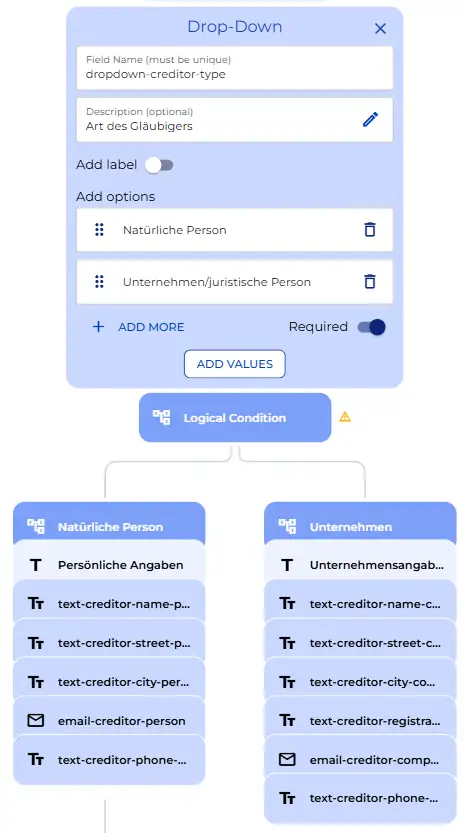
| German | English |
|---|---|
| ”Angaben zum Gläubiger” | Creditor details (section heading) |
| “Art des Gläubigers” | Type of creditor |
| ”Natürliche Person” | Private individual |
| ”Unternehmen/juristische Person” | Company / legal entity |
| ”Persönliche Angaben” | Personal details |
| ”Vor- und Nachname” | First and last name |
| ”Straße und Hausnummer” | Street and house number |
| ”Postleitzahl und Ort” | Postal code and city |
| ”Unternehmensangaben” | Company details |
| ”Handelsregisternummer (falls vorhanden)“ | Commercial register number (if applicable) |
Step 3: Insolvency Case Details
Four text fields and one date field capture the insolvency case details: the debtor’s name or firm name, the name of the responsible insolvency court, the case reference number, the name of the insolvency administrator, and the optional date when proceedings were formally opened.
The opening date is optional because creditors often receive a claims filing notice before the formal opening date appears in public records.
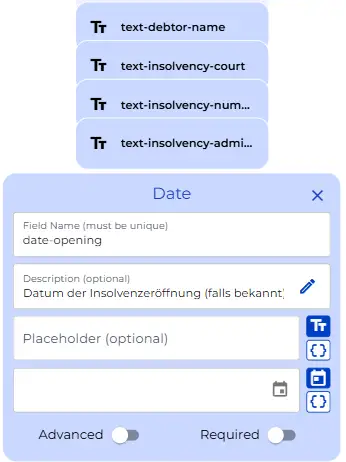
| German | English |
|---|---|
| ”Angaben zum Schuldner und Insolvenzverfahren” | Details of the debtor and insolvency proceedings (section heading) |
| “Name des Schuldners/der insolventen Firma” | Name of the debtor / insolvent company |
| ”Zuständiges Insolvenzgericht” | Responsible insolvency court |
| ”Aktenzeichen des Insolvenzverfahrens” | Case reference number of the insolvency proceedings |
| ”Name des Insolvenzverwalters” | Name of the insolvency administrator |
| ”Datum der Insolvenzeröffnung (falls bekannt)“ | Date proceedings were formally opened (if known) |
Step 4: Claim Type, Legal Basis & Annotation
The creditor selects the category of their claim from a dropdown: a standard insolvency claim arising before proceedings opened, a mass claim arising after, or a claim backed by a security right. Directly below that dropdown sits an annotation node. On the canvas, this is a small info icon that reveals a plain-language explanation of all three claim types when the user hovers over it. It is backend configuration, but it directly reduces the support questions your team receives from creditors who are unfamiliar with German insolvency classification.
Below the claim type, a second dropdown asks for the legal basis of the claim: purchase contract, works contract, loan, tenancy agreement, salary claim, damages, or other. If the user selects “other”, a logic node activates a free text field for a custom description. All other selections skip that field entirely.
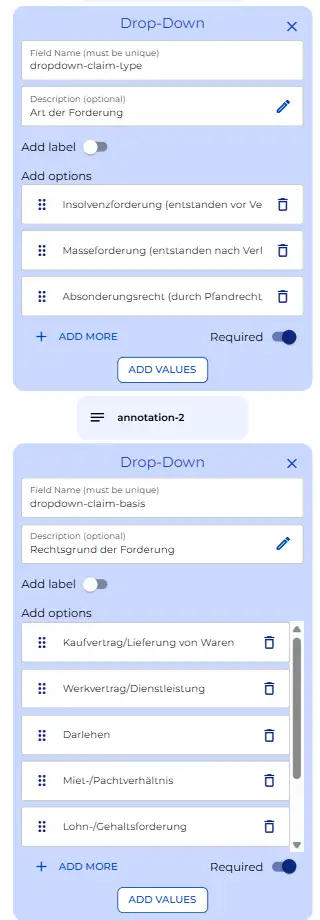
| German | English |
|---|---|
| ”Angaben zur Forderung” | Claim details (section heading) |
| “Art der Forderung” | Type of claim |
| ”Insolvenzforderung (entstanden vor Verfahrenseröffnung)“ | Standard insolvency claim (arose before proceedings opened) |
| “Masseforderung (entstanden nach Verfahrenseröffnung)“ | Mass claim (arose after proceedings opened) |
| “Absonderungsrecht (durch Pfandrecht/Sicherheit gedeckt)“ | Claim backed by a security right (secured by pledge / collateral) |
| “Erläuterung zu Forderungsarten” | Explanation of claim types (annotation tooltip) |
| “Rechtsgrund der Forderung” | Legal basis of the claim |
| ”Kaufvertrag/Lieferung von Waren” | Purchase contract / delivery of goods |
| ”Werkvertrag/Dienstleistung” | Works contract / service |
| ”Darlehen” | Loan |
| ”Miet-/Pachtverhältnis” | Tenancy / lease agreement |
| ”Lohn-/Gehaltsforderung” | Wage / salary claim |
| ”Schadenersatz” | Damages |
| ”Sonstiges” | Other |
| ”Bitte spezifizieren Sie den Rechtsgrund” | Please specify the legal basis (appears when “Other” is selected) |
Step 5: Claim Amounts & Conditional Logic
The principal amount is a mandatory number field with two decimal places and a minimum of zero. Below it, a multi-select checkbox group lets the creditor declare additional claims: interest, late payment fees, legal fees, and other ancillary costs. Each selection activates its own conditional logic branch.
The interest branch reveals an amount field, an interest rate field that defaults to five percent, and a start date. The late payment fees branch reveals a single amount field. The legal fees branch reveals a single amount field. The other costs branch reveals both an amount and a free text description of what the costs represent.
At the end of this section, a calculation node sums all amounts that are active and is configured to display the running total to the user in real time. This means creditors see their total claim update as they fill in each figure, which reduces errors before submission.
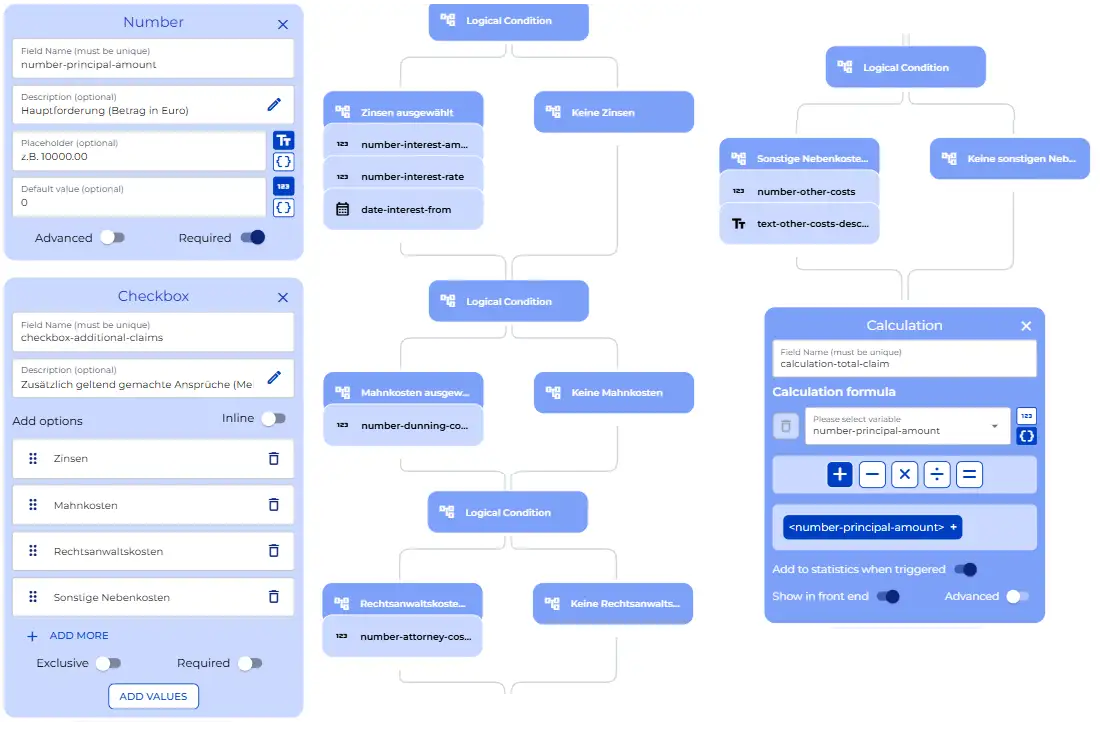
| German | English |
|---|---|
| ”Hauptforderung (Betrag in Euro)“ | Principal amount (in euros) |
| “Zusätzlich geltend gemachte Ansprüche (Mehrfachauswahl möglich)“ | Additional claims (multiple selection possible) |
| “Zinsen” | Interest |
| ”Mahnkosten” | Late payment fees / dunning costs |
| ”Rechtsanwaltskosten” | Attorney fees |
| ”Sonstige Nebenkosten” | Other ancillary costs |
| ”Zinsbetrag in Euro” | Interest amount in euros |
| ”Zinssatz in Prozent” | Interest rate in percent |
| ”Zinsen ab welchem Datum?” | Interest from which date? |
| ”Mahnkosten in Euro” | Late payment fees in euros |
| ”Rechtsanwaltskosten in Euro” | Attorney fees in euros |
Step 6: Claim Description & Collateral
A date field asks when the claim arose, followed by a large text area where the creditor describes the claim in detail: how it came about, what service or goods were delivered, when invoices were issued, and whether written contracts exist. The placeholder text in the text area walks the user through exactly what to include, which is valuable for creditors who have never filed a proof of claim before.
Below the description, a yes/no checkbox asks whether the claim is backed by collateral. If yes, a logic branch activates a dropdown for the type of security — pledge, security transfer of title, land charge, guarantee, retention of title, or other — followed by a text area for a full description of the collateral, including estimated value and the date it was established.
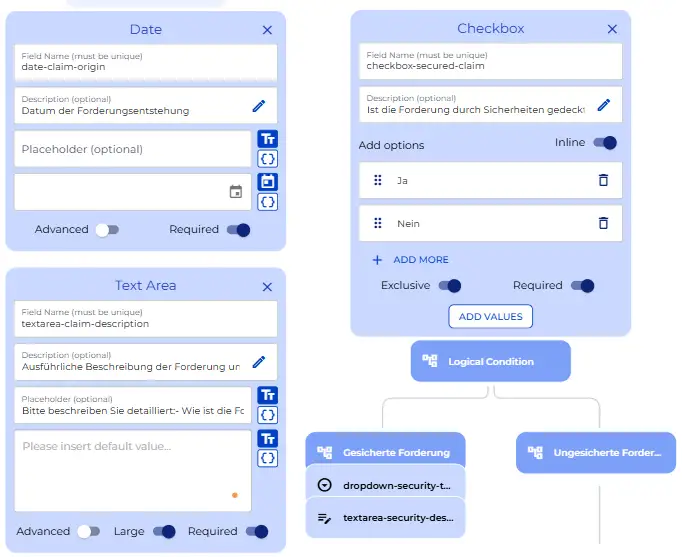
| German | English |
|---|---|
| ”Entstehung und Begründung der Forderung” | Origin and grounds of the claim (section heading) |
| “Datum der Forderungsentstehung” | Date the claim arose |
| ”Ausführliche Beschreibung der Forderung und ihrer Entstehung” | Detailed description of the claim and its origin |
| ”Ist die Forderung durch Sicherheiten gedeckt?” | Is the claim secured by collateral? |
| ”Ja” / “Nein” | Yes / No |
| ”Art der Sicherheit” | Type of security |
| ”Pfandrecht” | Pledge |
| ”Sicherungsübereignung” | Security transfer of title |
| ”Grundschuld/Hypothek” | Land charge / mortgage |
| ”Bürgschaft” | Guarantee |
| ”Eigentumsvorbehalt” | Retention of title |
| ”Sonstige Sicherheit” | Other security |
| ”Beschreibung der Sicherheit” | Description of the collateral |
Step 7: Document Upload & Bank Details
An annotation node cites § 174 Abs. 1 InsO (German Insolvency Code) and lists the types of documents that must be attached: invoices, contracts, delivery notes, correspondence, bank statements, and security agreements. The file upload node accepts PDF and JPG files, up to ten files per submission.
Critically, this upload node is configured as a knowledge base input, which means the uploaded documents are made available to the AI analysis node that runs later. Below the upload, a yes/no checkbox asks whether the creditor wants to provide bank account details for potential disbursements. If yes, fields for IBAN, optional BIC, and optional bank name appear.
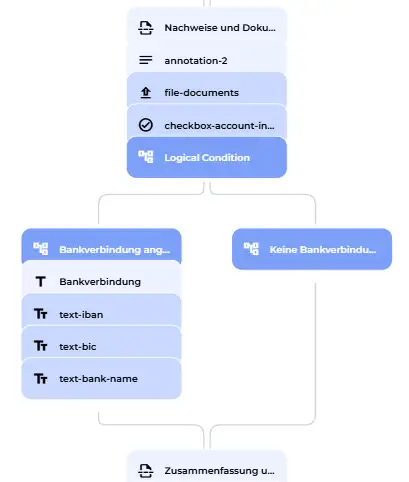
| German | English |
|---|---|
| ”Nachweise und Dokumente” | Evidence and documents (section heading) |
| “Welche Dokumente sollten beigefügt werden?” | Which documents should be attached? (annotation tooltip) |
| ”§ 174 Abs. 1 InsO” | Section 174(1) of the German Insolvency Act |
| ”Rechnungen” | Invoices |
| ”Verträge” | Contracts |
| ”Lieferscheine” | Delivery notes |
| ”Mahnungen” | Dunning letters |
| ”Korrespondenz” | Correspondence |
| ”Kontoauszüge” | Bank statements |
| ”Sicherungsverträge” | Security agreements |
| ”Belege und Dokumente zur Forderung hochladen” | Upload supporting documents for the claim |
| ”Möchten Sie Ihre Bankverbindung für eventuelle Zahlungen angeben?” | Would you like to provide your bank details for potential payments? |
| ”Bankverbindung” | Bank details (section heading) |
| “Name der Bank (optional)“ | Bank name (optional) |
Step 8: Boilerplate Assembly & AI Analysis
Before the AI node runs, a series of boilerplate nodes assemble the collected values into reusable formatted blocks: the creditor’s address block, the interest detail block, dunning costs, attorney fees, other ancillary costs, the security description, and the bank details. These assembled strings are then passed into the AI analysis node as part of the dynamic prompt.
The AI node triggers immediately and automatically the moment all upstream inputs are available. There is no button for the user to press. It reads the complete form data and the uploaded documents together, and it sends everything to a system prompt configured around § 174 f. InsO (German Insolvency Code). The prompt instructs the model to evaluate whether the claim is correctly classified, whether all required information is complete, what the likely outcome of the filing is, and whether there are any legal particularities the creditor should address before submitting. The loading message “Analysing the claim filing…” is what the user sees while the model works. The output populates a highlighted text panel on the form with the legal assessment.
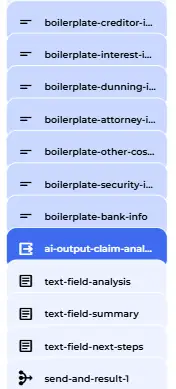
| German | English |
|---|---|
| ”Zusammenfassung und Dokumentenerstellung” | Summary and document creation (section heading) |
| “Zinsen in Höhe von … EUR” | Interest in the amount of … EUR |
| ”Mahnkosten in Höhe von … EUR” | Late payment fees of … EUR |
| ”Rechtsanwaltskosten in Höhe von … EUR” | Attorney fees of … EUR |
| ”Sicherheit:“ | Collateral: |
| “Bankverbindung:“ | Bank details: |
| “Analysiere Forderungsanmeldung…” | Analysing the claim filing… (loading message) |
| “Rechtliche Einschätzung” | Legal assessment (AI output heading) |
Step 9: PDF Generation
The PDF generation node also triggers immediately after the user submits the form. It uses the document template and assembles a formally structured claim letter addressed to the insolvency administrator. The letter covers seven numbered sections: creditor information, claim type, claim amounts broken down into principal and each category of additional claim, legal basis and detailed origin description, collateral, bank details, and a list of annexes. The file is named “Forderungsanmeldung Insolvenz” by default, and a download button appears on screen as soon as the document is ready.
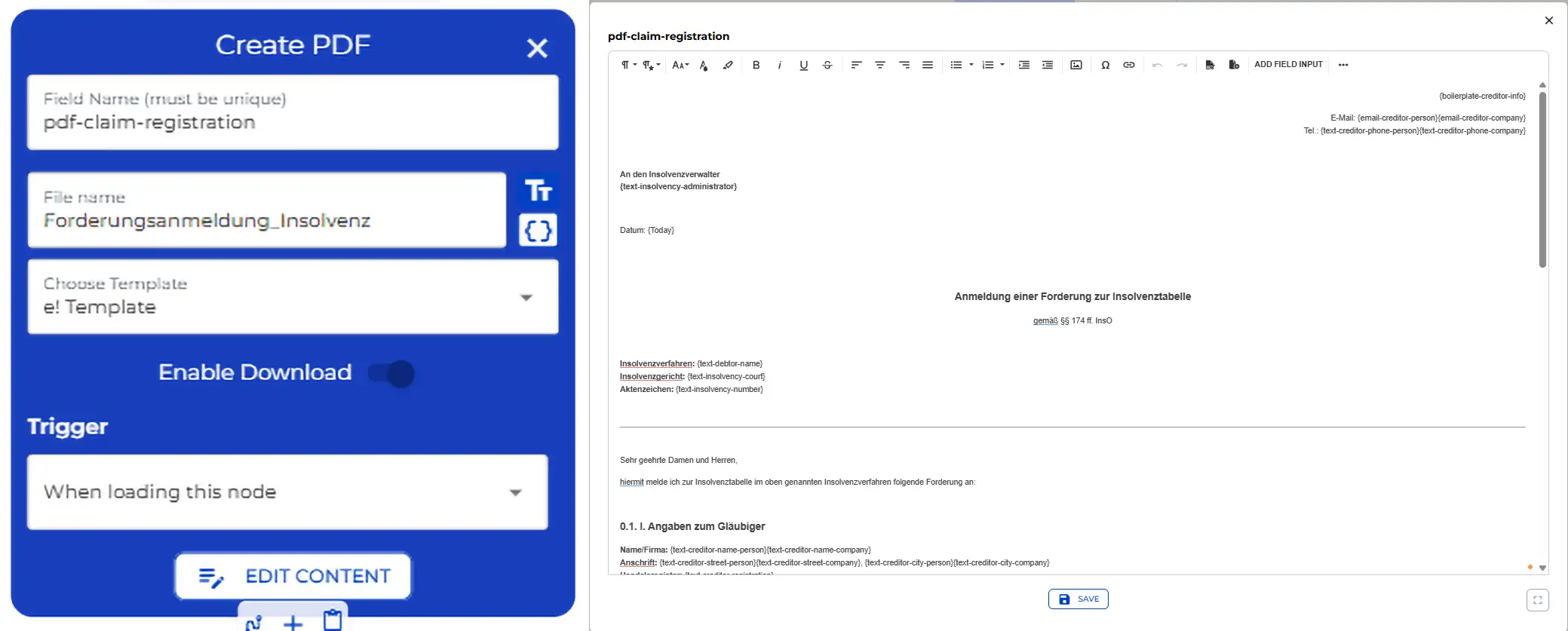
| German | English |
|---|---|
| ”Forderungsanmeldung_Insolvenz” | Insolvency Claim Filing (PDF filename) |
| “Anmeldung einer Forderung zur Insolvenztabelle” | Registration of a claim in the insolvency schedule (document title) |
| “gemäß §§ 174 ff. InsO” | In accordance with §§ 174 ff. of the German Insolvency Act |
| I. “Angaben zum Gläubiger” | Creditor details |
| II. “Art der Forderung” | Type of claim |
| III. “Forderungsbetrag” | Claim amount |
| ”Hauptforderung” / “Nebenforderungen” / “Gesamtforderung” | Principal amount / Additional claims / Total claim |
| IV. “Rechtsgrund und Entstehung der Forderung” | Legal basis and origin of the claim |
| V. “Sicherheiten” | Collateral |
| VI. “Bankverbindung” | Bank details |
| VII. “Anlagen” | Annexes |
| ”PDF herunterladen” | Download PDF (button label) |
Part 2: The User View
The bot opens with a welcome panel that sets context for the creditor. It states the purpose, references the relevant law, and flags the deadline rule before any data entry begins.
The first step is the creditor type dropdown. Selecting “Company/legal entity” causes the form to adapt immediately and show the company-specific fields. The creditor enters the firm name, street address, postal code and city, then moves on to the insolvency case section: debtor firm name, insolvency court, case reference number, administrator name, and the date proceedings opened.
The claim type is set to “Standard insolvency claim” and the legal basis to “Purchase contract / delivery of goods”. After entering the principal amount, the creditor ticks the interest and legal fees checkboxes. The form expands to show the interest amount, interest rate, and start date, plus the legal fees amount. The total claim updates in real time at the bottom of the section.
The creditor then enters the date the claim arose and fills in a description of the unpaid delivery in the text area, selects “No” for collateral, uploads the relevant invoice and delivery note as PDF files, and provides bank details.
The bot runs the legal analysis automatically. The loading message appears while the model works. A highlighted panel then displays the insolvency law assessment: classification confirmed, no missing required fields, and an outlook on the filing’s success. Below that, the summary panel shows all entered data in a compact overview, and the next steps panel lists exactly what to do next.
The bot confirms the submission. The PDF generates automatically and the download button appears. The creditor now has a formally structured, ready-to-sign claim letter in under five minutes.
Every step visible on this canvas is configurable to your own firm details, document naming conventions, and system prompt thresholds.
Happy automating with e!